 Devoria
Vibe coding course: get your iPhone app ready for the App Store
Vibe coding means describing what you want to an AI and letting it write the code. For an iPhone app, you also have to check the result: between your prompt and the App Store, there's signing, TestFlight, the subscription and Apple's review. This vibe coding course, as a kit, takes you all the way with your own app, in four self-paced steps.
By Mehdi Azizi · Reviewed on
What you'll learn
- Vibe coding for mobile
- React Native and Expo, the stack behind my iPhone apps, with a method: one screen at a time, reviewed and tested before the next.
- Rules that keep the AI on track
- An instructions file for your project, simple tests, and the right way to ask for a fix without breaking what worked.
- Everything AI doesn't do
- Developer account, App Store Connect, TestFlight, RevenueCat subscriptions, review submission: the steps where generated apps get stuck.
- Your app checked on a real iPhone
- Small screen, large screen, iPad mode: you learn to see what Apple will see before you send your app.
Step by step
- Step 1
Pick an app that can earn. The idea, the audience, the price. Then the starter code in your name.
- Step 2
Build the core of the app. Claude codes it, a skill checks it, you test it on your iPhone.
- Step 3
Plug in the money. Onboarding, paywall and subscriptions: already coded, you just set them up.
- Step 4
Publish and get found. Pre-submission check, screenshots and a listing in 30 languages.
A working demo isn't enough: here's what to check
Take a simple feature: checking off a habit. It must stay checked after the app closes, stay usable if the network drops and display text without cutting off the main button. Describe these conditions to your agent before asking for the code.
For subscriptions, the bar changes: you also need to check the products shown, a test purchase, its cancellation and restore on the right account. A paywall screenshot proves none of these behaviors.
All three paths lead to the same kit
iOS course, vibe coding and Claude Code are three ways into the same iOS Kit. You don't pay for three courses. Pick the entry that matches where you're stuck: learning the full path, steering an AI or working specifically with Claude Code.
You can start with the free guides below. The kit becomes useful if you want to start from the starter code of my apps, follow a written path and have the skills review your submission before sending it to Apple.
Why vibe coding gets stuck on iPhone
A web demo in a browser and an app distributed on the App Store don't go through the same steps. On iPhone, you have to handle signing, test the binary, set up any purchases and submit a version to Apple's review.
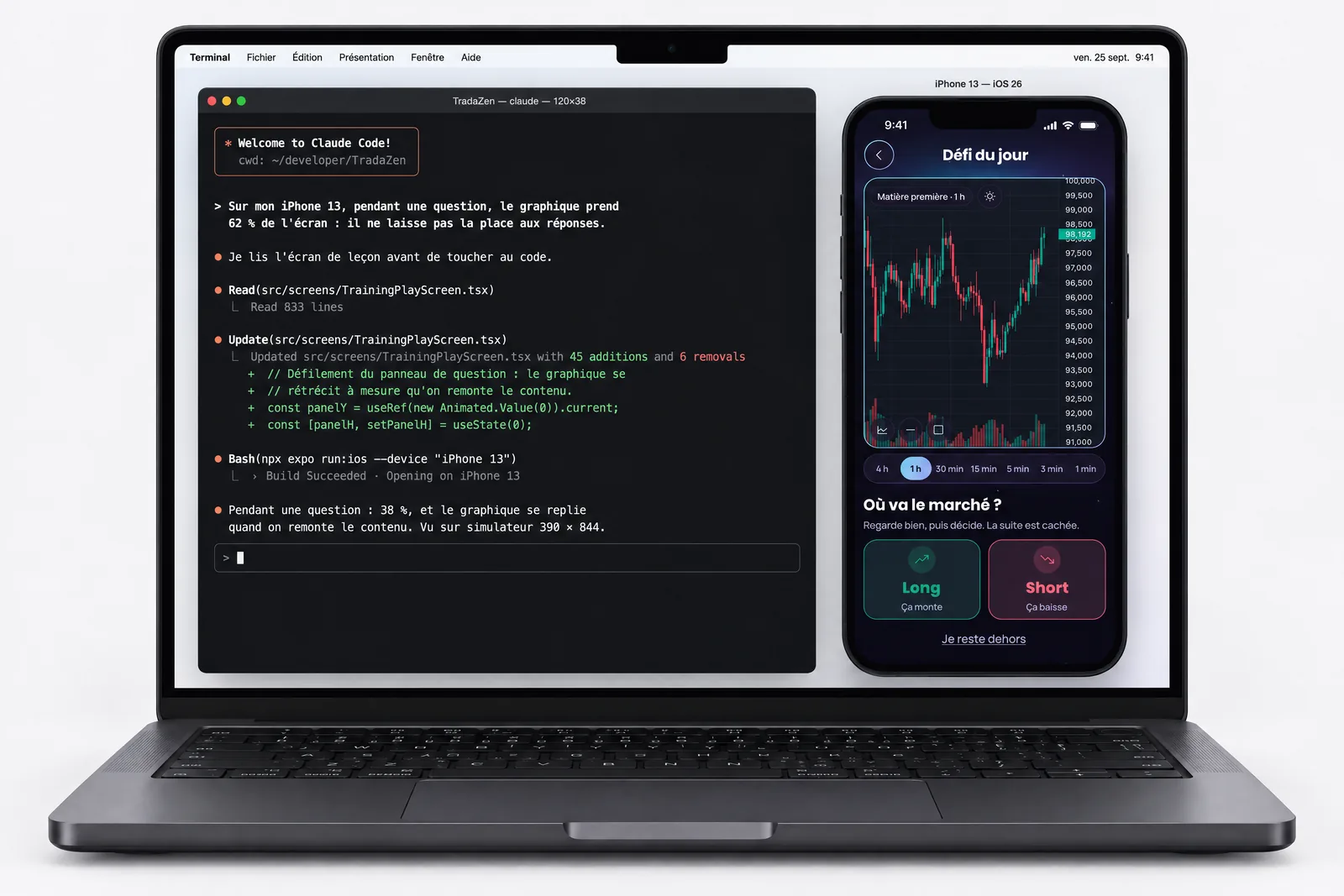
An agent can inspect screenshots and run tests if you give it the right tools. Without those checks, a cut-off button, missing purchase restore or onboarding stuck on iPad can slip through. Those are exactly the details that get an app rejected.
Who this vibe coding course is for
For you if you've never published an app, whether you code or not, and want to use Claude, Cursor or ChatGPT to move faster. You need an iPhone and a computer. A Mac isn't required: iOS builds happen in the cloud with EAS.
It's not for you if you want a degree, a certification or a CPF-funded course. It's not a promise of income either: you work toward an app ready to submit and a reusable method. Publishing depends on Apple's review, and income on your product and its audience.
What an AI-built app really costs
Apple's developer program membership is required to publish: $99 a year. An AI tool subscription is recommended. Expo, EAS, RevenueCat and Supabase have free tiers, with quotas and limits. Whether they're enough depends on your project; AI API calls, for example, can add costs from the start.
The iOS Kit costs €129.99, one time, with 1 year of updates included, then €49.99 a year if you want to keep going.
The best vibe coding course in 2026
It depends on what you want to build. For a CPF-funded certificate, look at Jedha or Lion. For two days in a company setting, Hypervibe. For one-on-one coaching, Vibe Academy. To publish your own iPhone app, the iOS Kit is the only option in this table built for that: the others target the web or internal tools.
| Course | Price | Length and format | Audience | Published iPhone app |
|---|---|---|---|---|
| Jedha, Vibe Coding course | 7 500 € | 450 hrs over 3 to 7 months, on campus or online | Comfortable with no-code, B1 English | Not mentioned |
| Lion (Maria Schools), Vibe Coding | 3 600 € incl. VAT, CPF-eligible | 6 weeks, about 10 hrs a week, remote | Marketers, entrepreneurs, project managers | Not mentioned |
| Hypervibe, Vibe Coding with Claude Code | 1 790 € excl. VAT | 2 days, video call or in person | Non-technical people, entrepreneurs, employees | Not mentioned |
| Vibe Academy, From Zero to Vibe Coder Pro | Not listed | 8 weeks, one-on-one remote coaching | Entrepreneurs and no-code beginners | Not mentioned |
| Devoria, iOS Kit | €129.99, one-time payment | Self-paced: starter code, 4-step path, Claude Code skills | Beginners, coders or not | Yes, that's the goal |
Official pages read on . Prices and formats may change: check them before you choose.
Is the iOS Kit right for you?
Do you want to publish your own iPhone app, not a website?
Does a self-paced kit suit you better than a degree or CPF funding?
Are you ready to work with an AI like Claude Code or Cursor?
Answer all three questions to see if it's the right format.
Why learn with me
I publish my own iOS apps coding with Claude and Cursor, every day. Solys, TradaZen, Nolera, and Vigie are on the App Store, another one in review at Apple. I've seen AI let mistakes through that Apple didn't: that experience, rejections included, is what you get.
Read the TradaZen story, from building it to Apple's rejections and launch.
Start with the free guides
FAQ
Do I need to code to take a vibe coding course?
No. You learn to describe what you want, review what the AI produces and check that it works. You'll understand your code over the weeks, without starting with months of theory.
What's the best vibe coding course?
The one that gets you to your goal. For a web tool, a two-day course or a certified program works. To ship your own iPhone app, you also need signing, TestFlight, the subscription and Apple's review: that's what this kit covers, in four steps.
Which vibe coding tool for an iPhone app?
An agent working in a real React Native and Expo project, like Claude Code or Cursor, keeps you in control of the code all the way to the App Store. App generators are faster at first, with less control later.
How do you learn vibe coding?
By building a real app, one feature at a time: you describe, the AI writes, you check on your phone. The free guides on this site give you the method. The kit adds the starter code from my apps, the written path and the skills that review your submission before sending it to Apple.
Is there a free vibe coding course?
For the basics, yes: the tools' official docs and this site's guides are free. What you pay for is the kit: the starter code, the path and the skills to get all the way to the App Store submission.
Which AI do you use?
Claude Code or Cursor: the kit gives the AI its rules and skills so it writes clean code. I work with both myself.
Will the app really get published?
The last step of the path is all about the App Store submission and sending it to Apple, with the checklist and skills from the Apple Review Kit. The final decision is Apple's: nobody can honestly guarantee it.
How much is the course?
€129.99, one time, with 1 year of updates included, then €49.99 a year if you want to keep going. The kit isn't CPF-eligible.
Can a real person look at my app?
Yes, outside the kit: One hour with me, a one-hour video call with screen sharing, on your app or your Claude project, for €100. The kit itself is self-paced, with no live classes.
Is the kit available right away?
The iOS Kit is available. Instant download after payment.

iOS Kit
The starter code behind my apps, the step-by-step path with the messages to give Claude, and every kit. Claude starts from an app that already runs. €129.99.